What is Recurring Transactions?
Recurring Transactions in Money Manager allow you to automate any financial entry that repeats on a regular basis. Whether it's your monthly salary, a daily grocery budget, a weekly transfer to savings, or any subscription or bill that recurs on a predictable schedule — simply set it up once and the app will add it automatically at every interval. You can define the amount, category, sub-type, account, repeat frequency, start date, and how many times it should repeat. This eliminates manual data entry for routine transactions and ensures your financial records are always complete and up to date without extra effort.
Set Once, Track Forever. Define a recurring transaction with your exact preferences — frequency, category, account — and Money Manager will automatically add it to your records at every scheduled interval without any further input needed.
Feature Highlights
See all the amazing capabilities in action:
Create a New Recurring Transaction
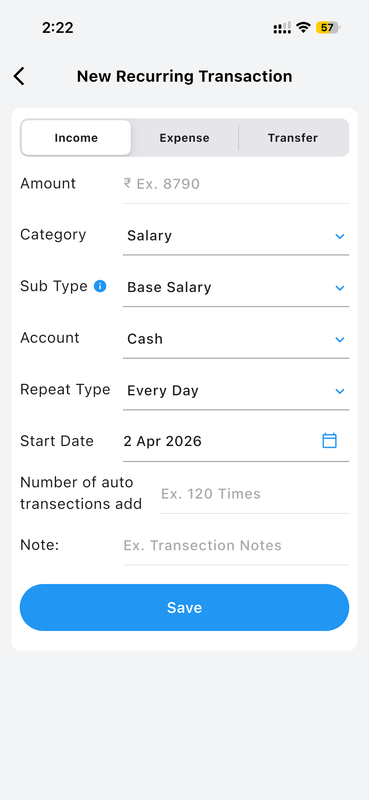
Setting up a new recurring transaction in Money Manager is straightforward and highly flexible. The New Recurring Transaction screen lets you choose whether the entry is an Income, Expense, or Transfer. Fill in the Amount, select a Category (such as Salary, Food, or Rent), pick a Sub Type for deeper classification (like Base Salary under Salary), and choose which Account the transaction should be recorded against — Cash, Savings, Bank Account, and more. Set the Repeat Type (Every Day, Weekly, Monthly, etc.), then select a Start Date using the built-in date picker. You can also limit the total repetitions and add a descriptive Note for each automated entry.
Configure Every Recurring Detail
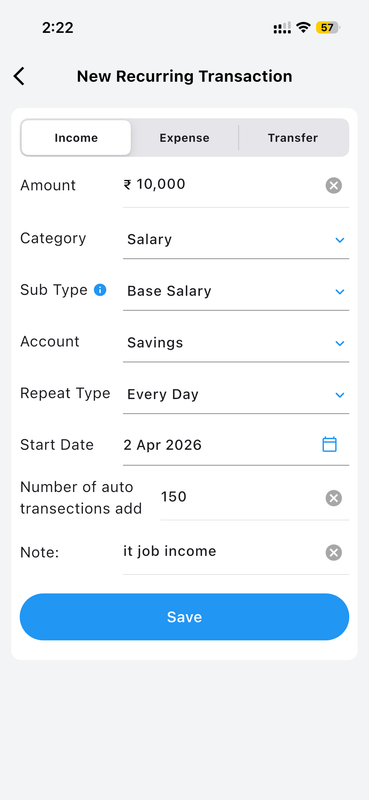
This screen shows a fully configured recurring income transaction — a daily salary entry of ₹10,000 categorized under Salary (Base Salary) credited to a Savings account, set to repeat Every Day starting from 2 April 2026, with 150 automatic additions planned and a note of "it job income." This example illustrates how precisely you can define every aspect of a recurring entry. The category and sub-type ensure it appears correctly in all reports, the account ensures the right balance is updated, and the repetition count ensures the automation stops at exactly the right time. This setup takes just seconds but saves hours of manual entry over weeks and months.
View All Active Recurring Entries
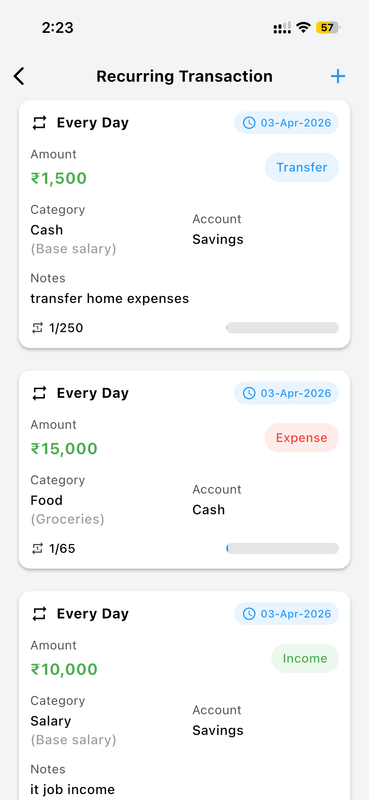
The Recurring Transaction list gives you a complete overview of all active automated entries at a glance. Each card displays the repeat frequency (such as Every Day), the next scheduled date, the transaction amount, category with sub-type, account, and any notes attached. Entries are color-coded by type: Transfer (blue label), Expense (red label), and Income (green label) — making it effortless to scan and instantly understand what is scheduled. A progress indicator shows how many of the planned repetitions have already been executed (e.g., 1/250 or 1/65), so you always know exactly how far along each automation is and how many remain to be processed automatically going forward.
How to Set Up Recurring Transactions
-
Open Recurring Transactions Navigate to the Recurring Transactions feature from the Settings menu or the main navigation of the app.
-
Tap the + Button Start creating a new recurring transaction by tapping the add (+) button at the top right of the Recurring Transaction list screen.
-
Fill in Transaction Details Enter the amount, category, sub-type, account, repeat type (daily/weekly/monthly), start date, number of repetitions, and an optional note.
-
Save the Entry Tap Save and the automation becomes active immediately. Entries will be added automatically to your records starting from the date you selected.
-
Monitor Progress from the List View all active recurring transactions in the list screen to track how many repetitions have completed and how many remain going forward.
Why You'll Love It
For anyone with regular financial commitments — a monthly rent payment, a daily savings transfer, a weekly grocery budget, or a recurring salary entry — Recurring Transactions is a genuine game-changer. Instead of remembering to add the same entry over and over, you define it once and the app handles everything automatically. Your reports stay accurate, your account balances stay updated, and your complete financial picture stays current — all without lifting a finger after the initial setup.
Combined with Money Manager's real-time sync and cloud backup, your recurring transaction data is always safe, always current, and always reflected correctly in every report and balance view you access.