What is the Cashbook?
The Cashbook in Money Manager is a dedicated tool for tracking money you lend to or borrow from others. Whether it's a loan to a friend, rent collected from someone, or a personal favour, every entry is recorded with the person's name, amount, account used, note, and date — so you always know exactly who owes what.
Never forget a payment again. Set reminders on any cashbook entry and Money Manager will notify you when it's time to follow up or settle the amount.
Cashbook Features
Everything you need to manage money lent and borrowed, in one organised tool:
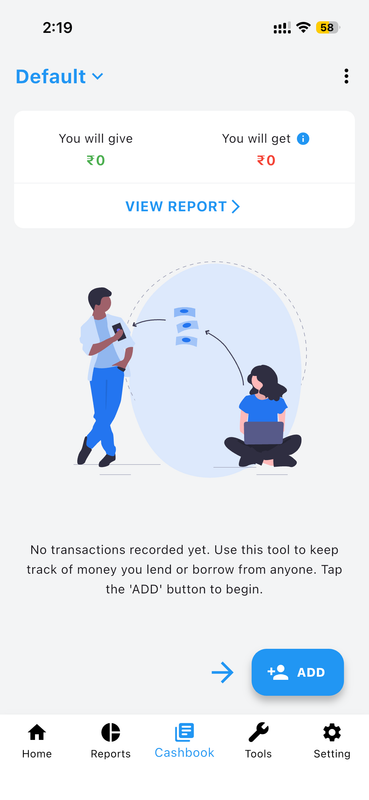
Instant Lend & Borrow Overview
The Cashbook home screen gives you an at-a-glance summary of your total outstanding balances. You can instantly see how much money you are yet to give (You will give) and how much you are yet to receive (You will get), so you always know your net position without having to scroll through each entry individually.
Tap View Report to dive into a detailed transaction report, or tap ADD to record a new lending or borrowing entry right away.
Create & Manage Multiple Cashbooks
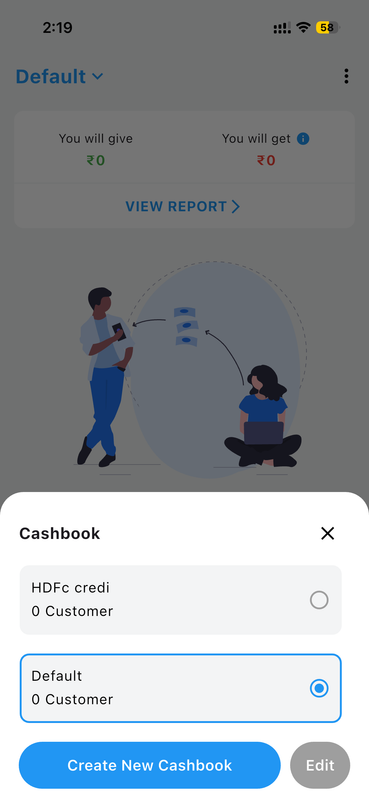
Money Manager lets you maintain separate cashbooks for different purposes. For example, you can create one cashbook for personal lending, another for a business account, or one for a shared family fund. Each cashbook has its own independent set of entries and contacts.
Switching between cashbooks is effortless — simply tap the cashbook name at the top to open the selector, choose an existing cashbook, or create a brand new one with a single tap on Create New Cashbook.
Record Money You Gave or Received
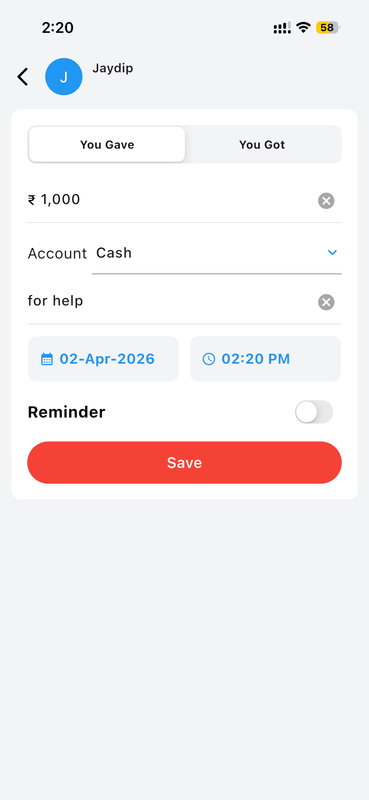
Adding a new cashbook entry is quick and straightforward. Select whether the transaction was money you Gave or money you Got, then enter the amount, choose the account it was paid from (such as Cash or a bank account), add a short note for context, and set the exact date and time of the transaction.
Every detail is saved against the contact's name, giving you a clear and organised record of all transactions with that person over time.
Set Payment Reminders
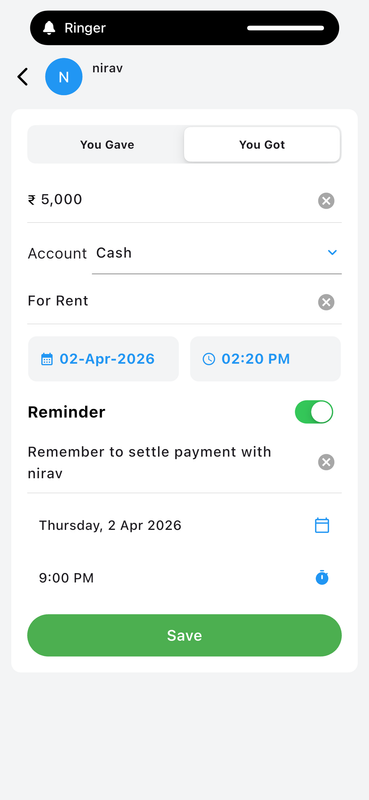
Never forget to follow up on a pending payment. When adding or editing a cashbook entry, simply toggle on the Reminder option and set a custom reminder message along with a specific date and time. Money Manager will send you a notification at exactly the right moment to remind you — or the other person — to settle the amount.
This is especially useful for recurring arrangements such as rent collection, monthly loans, or any payment that has a defined due date.
Filter & Search Cashbook Reports
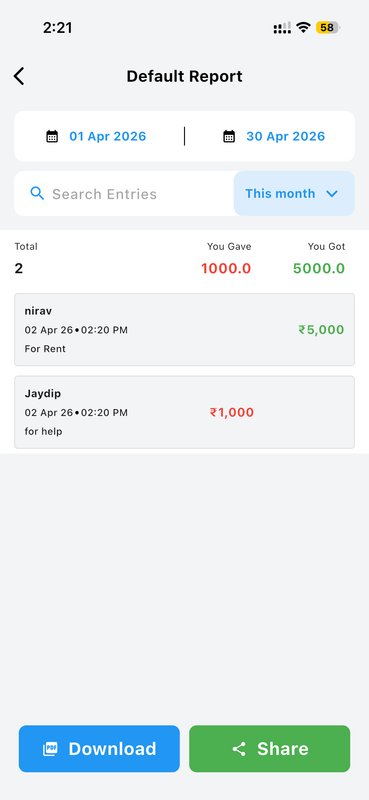
The Cashbook Report screen gives you a complete, filtered view of all your lending and borrowing activity. You can set a custom date range or use quick filters like This Month to narrow down the results. A built-in search bar lets you quickly find entries by person name or note keyword.
The summary at the top shows the total number of entries, the total amount you gave, and the total amount you received — giving you an instant financial picture for the selected period.
Download & Share PDF Reports
Once you have filtered your cashbook report to the desired time period, you can instantly download it as a PDF file directly to your device or share it with anyone via any app — WhatsApp, email, or cloud storage. Each report includes all entry details such as the person's name, date, note, and amount.
This makes it easy to share a summary with the other party, keep a printed record, or send a professional payment statement when needed.
Per-Person Statement & Settle Account
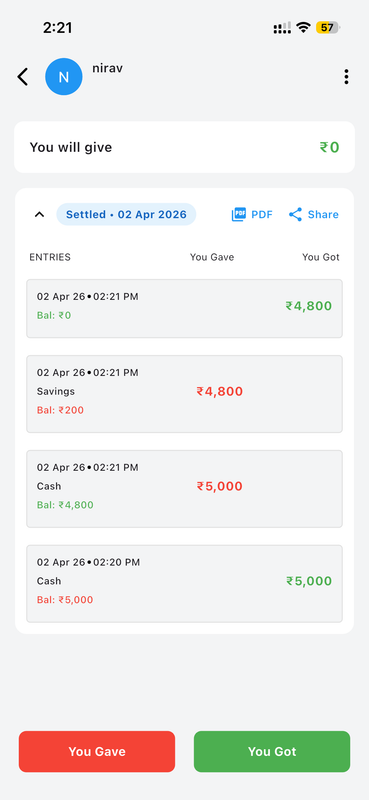
Tap on any contact in your cashbook to view a full transaction history with that person. Each entry shows the exact date, time, account used, running balance after every transaction, and whether it has been settled. Settled entries are clearly marked so you always know which transactions are closed.
You can also export or share the individual statement as a PDF directly from this screen, making it easy to send a clear settlement summary to the other person with just one tap.
How to Use the Cashbook
-
Open the Cashbook Tab Launch Money Manager and tap the Cashbook icon in the bottom navigation bar to open your cashbook.
-
Create or Select a Cashbook Tap the cashbook name at the top to switch between existing cashbooks or create a new one for a different purpose.
-
Add a New Entry Tap the ADD button, select the contact, choose whether you Gave or Got money, enter the amount, add a note, and set the date and time.
-
Set a Payment Reminder (Optional) Toggle on the Reminder option to add a custom message and schedule a notification for when the payment is due.
-
View Reports & Settle Tap View Report to see a filtered summary of all transactions. Open any contact's profile to view their statement and mark the account as settled.
-
Download or Share a PDF From the report or contact view, tap Download or Share to export a complete PDF statement to your device or send it via any app.
Why the Cashbook Matters
Informal lending and borrowing is a part of everyday life — but it's easy to forget who owes what, especially when amounts accumulate over time. The Cashbook in Money Manager brings clarity and accountability to every personal or professional financial arrangement, replacing scattered notes and memory with a clean, organised digital record.
Whether you're a small business owner collecting payments, a landlord tracking rent advances, or simply someone who often helps friends and family — the Cashbook keeps every rupee accounted for, with full transparency and zero guesswork.